
Tribal Knowledge Context for Coding Agents
Your AI coding agent just helped you debug a gnarly authentication issue. But when you or a teammate hit the same problem next week, that knowledge is gone, buried in a chat transcript no one will ever find again.
Dexicon captures semantic knowledge your team learns while coding with AI and makes it searchable. The decisions, the debugging sessions, the "oh that's why it works that way" moments. Knowledge compounds instead of disappearing.
Dexicon is built for both solo developers and teams
<5 min setup
We don't touch your source code through our CLI
How Teams Use Dexicon
Debugging with historical context: You hit a cryptic error in the payments service. Search Dexicon to see if anyone has encountered it before. If so, you get the root cause and solution without re-investigating.
Encoding team standards. An engineer uses create_knowledge to capture best practices such as "all new DB tables should include seeded data & support soft deletion."
Resuming work across sessions. You started debugging on Friday and forgot where you left off on Monday. Ask your agent "where did I leave off on the auth work?".
Onboarding engineers. Instead of answering the same questions repeatedly, point new hires to Dexicon. They can search for past decisions, ramp up faster with real context instead of stale documentation.
Track AI adoption. Engineering leaders can use our dashboard to view AI coding tool usage. Track weekly active users, sessions per engineer, token usage, and drill down.
How It Works
Knowledge Sources
Dexicon currently indexes agent sessions and documents.
Documents include technical specs, PRDs, design docs, runbooks, post-mortems, and other written team knowledge. Upload files directly or sync from Google Drive and Notion.
Sessions are captured AI coding agent conversations from Claude Code, Cursor, and other AI coding tools. These contain the raw transcript, decisions made, and solutions discovered during development work.
Knowledge is then extracted out of these data primitives into a searchable, self-updating knowledge base.
Both humans and agents can run queries for past solutions, retrieve relevant documentation, and get context without digging through Slack, wikis, or asking teammates.
Knowledge Extraction
When data is indexed or synced, Dexicon automatically extracts the knowledge worth keeping. Each knowledge item is atomic, capturing one self-contained concept or idea.
Upload a design doc and multiple knowledge items may be extracted: the architecture decision, the tradeoffs, the API contract, and the dependencies. Upload a post-mortem and Dexicon will extract the root cause, the fix, and the lessons learned.
We extract the following knowledge from agent sessions:
- Tasks: what was built
- Bugs: what broke, why, and how it was fixed
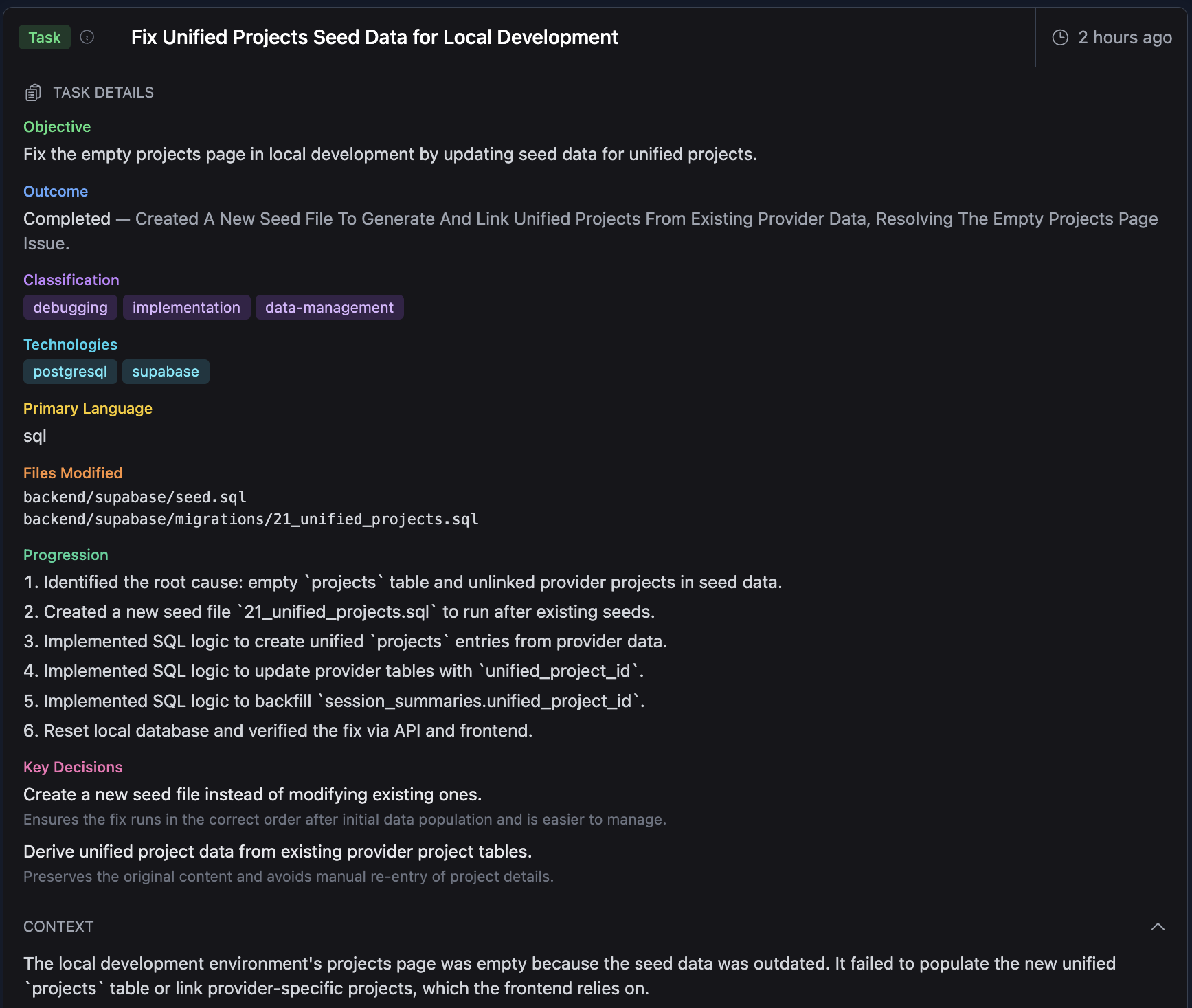
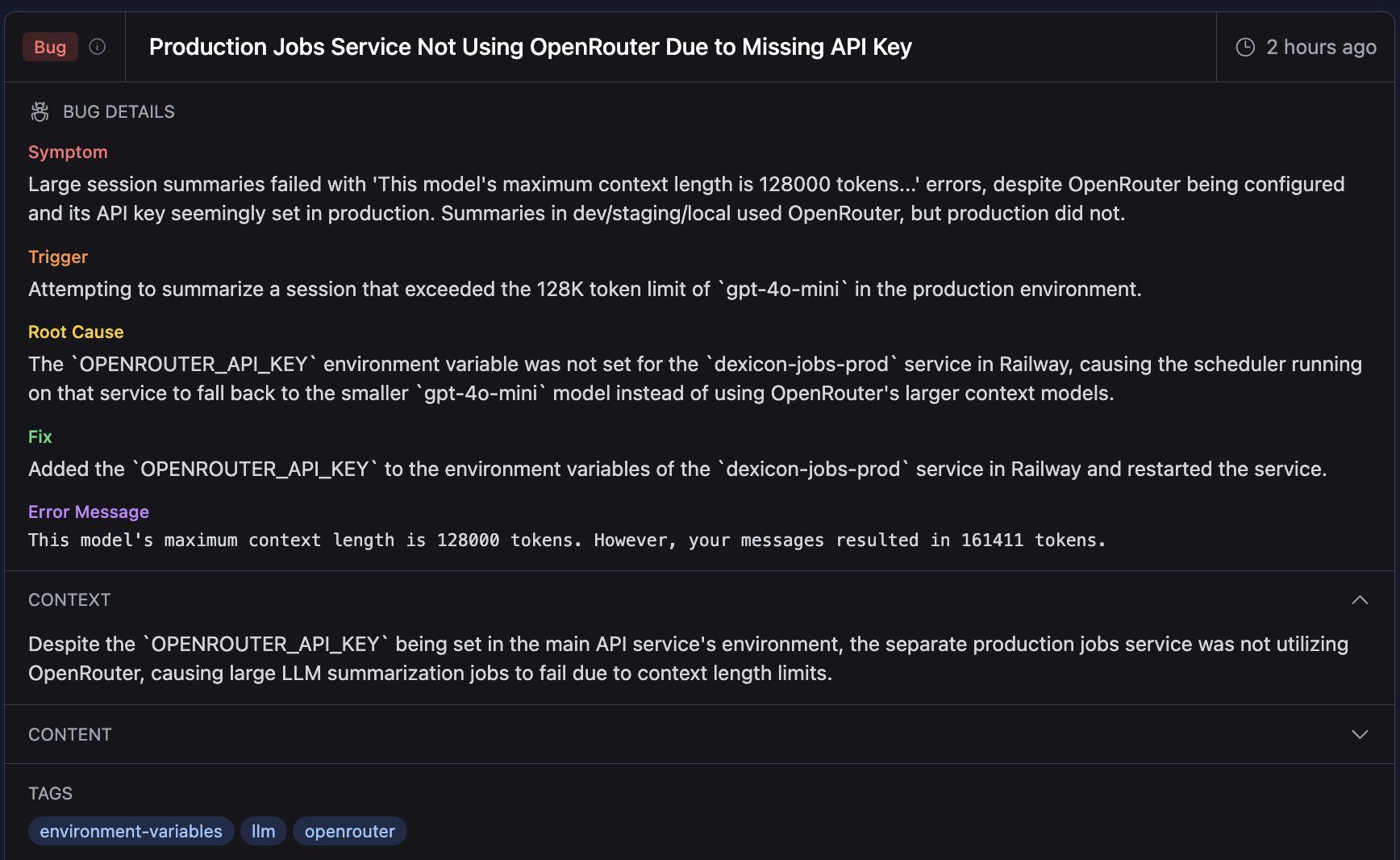
Dexicon automatically links related knowledge items together. When you search for a term, related decisions, sessions, and documents are also returned.
We're actively expanding extraction to capture additional knowledge types such as key decisions and team standards from sessions and other indexed data.
User-Uploaded Knowledge
You can also contribute knowledge directly to your graph via the Dexicon MCP. This is useful for capturing institutional knowledge that doesn't live in a document or session, like architecture decisions, team conventions, or hard-won lessons from production.
Use the create_knowledge tool to add a new knowledge item. Dexicon automatically links it with semantically related nodes in your graph.
Direct UI creation is coming soon by popular demand. For more details on connecting to the Dexicon MCP, see the MCP section below.
The Knowledge Graph
Dexicon automatically creates relationships between knowledge items.
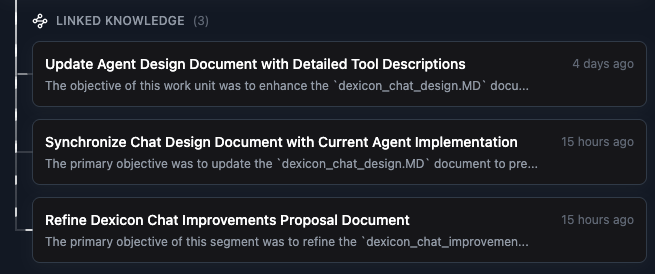
The result is a searchable knowledge graph connecting every insight to related concepts and underlying data across your entire engineering systems, making tribal knowledge discoverable instead of lost.
Projects in Dexicon map 1:1 with the GitHub repos when you upload agent sessions. You can link documents to projects, so your design docs, runbooks, and post-mortems stay connected to the codebase they describe.
Features
Search Your Knowledge Base
Access your knowledge graph at https://app.dexicon.ai/knowledge-base.
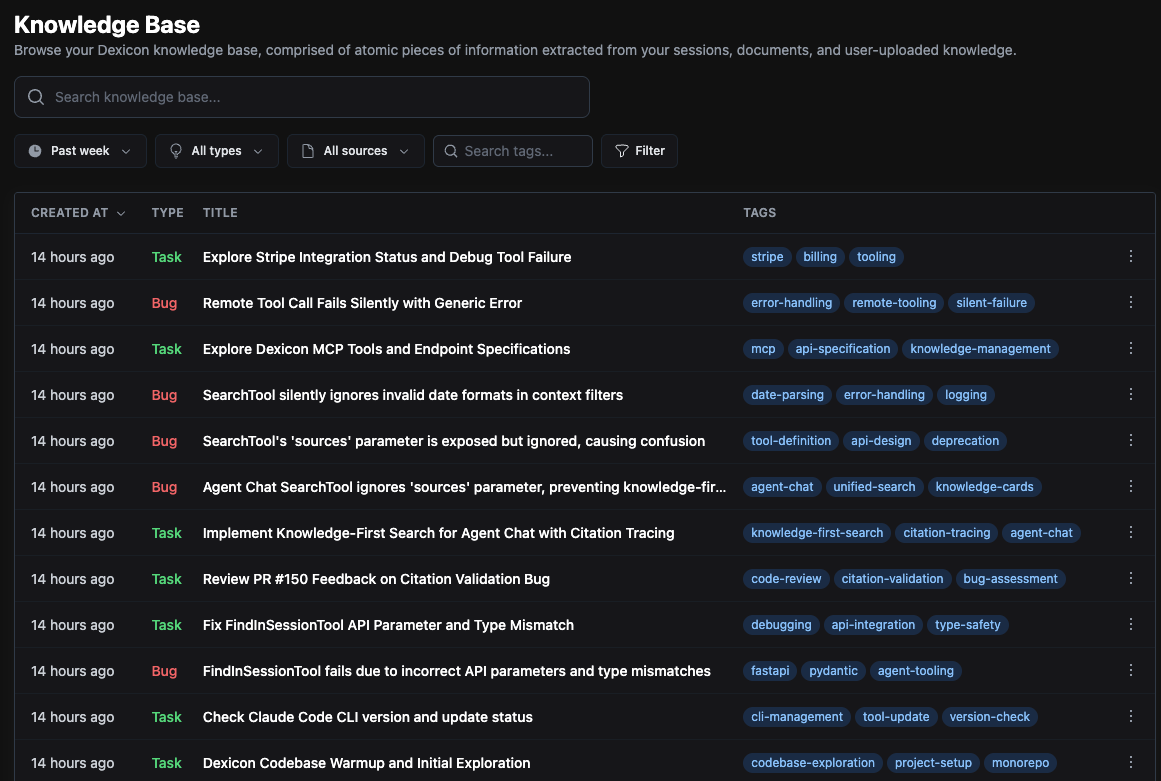
Filter by time, knowledge type (bug, standard, task, decision, etc.), and source (session, document, or user-uploaded). You can also search by tags to quickly find related knowledge.
Recent Work
Ever come back from vacation and wonder what happened while you were gone or forget what you were working on? The get_recent_work tool gives you a timeline view of work across your team.
Ask your AI coding agent questions like:
- "What did I do yesterday?"
- "What has the team been working on this week?"
- "What's the progress on the Stripe integration?"
Results are pulled from uploaded sessions, scoped to your work or the entire team. Once you find a relevant session, you can drill into the full transcript for details.
Dexicon Chat
Want to skip the MCP setup and just talk to your knowledge graph directly?
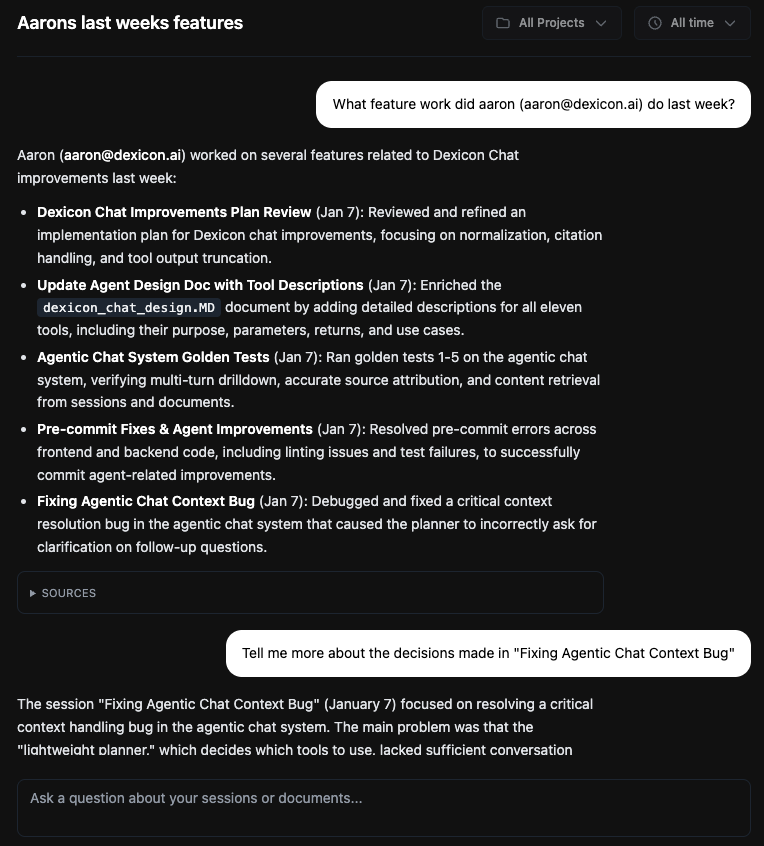
Visit https://app.dexicon.ai/chat to chat with the Dexicon agent.
This is a quick way to query all uploaded data, ask about past work, and surface relevant knowledge without leaving the browser.
Agent Sessions and Projects
Dexicon automatically organizes synced sessions by git repo. Everyone working on the same repo contributes sessions to the same project. No manual setup required.
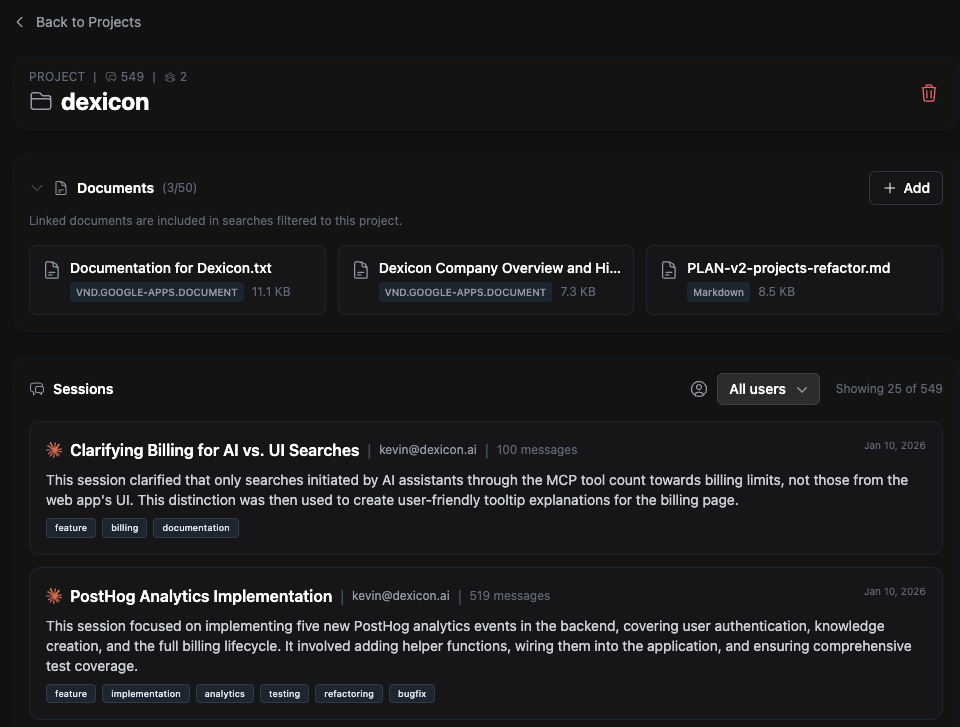
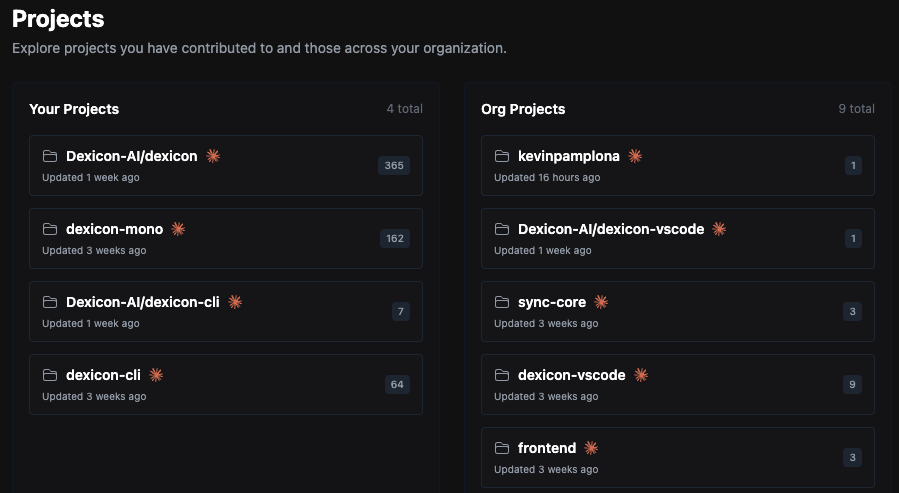 Manage projects at https://app.dexicon.ai/projects.
You can also link documents to related projects. When your agent searches and filters, it respects these relationships and surfaces only what's relevant to your current git repo.
Linking documents will also help us improve your knowledge graph.
AI Adoption Metrics (Admins Only)
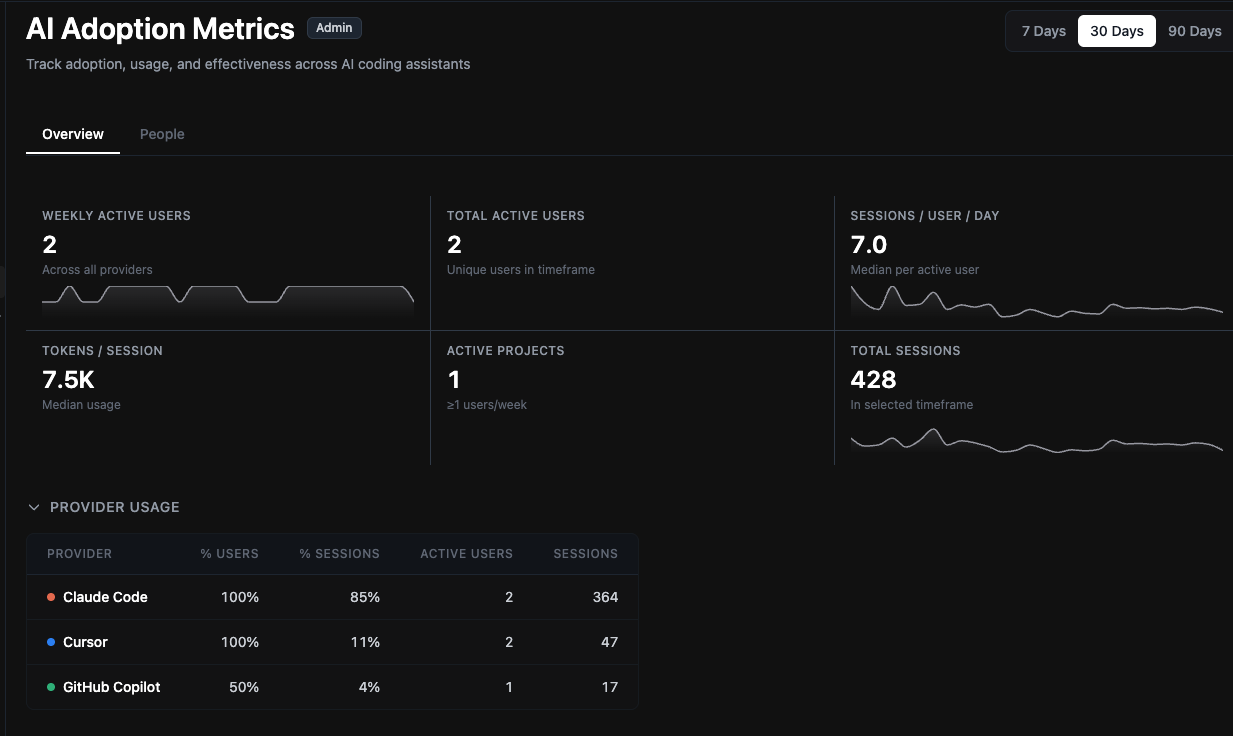
Track how your team is using AI coding tools at https://app.dexicon.ai/org-metrics.
See weekly active users, sessions per user per day, which providers are used (Claude Code, Cursor, Codex, etc), and model usage across your organization. Useful for engineering leaders who want visibility into AI adoption and usage.
Dexicon MCP
For setup and full tools list, see our MCP documentation.
The Dexicon MCP gives your AI coding agent direct access to your knowledge graph. Here are the key tools:
search is the primary way to query your knowledge base. It performs semantic search across knowledge items, sessions, and documents. Your agent knows how to use progressive disclosure, starting with knowledge items and drilling into full sessions or documents.
create_knowledge lets you add knowledge directly to your graph during a coding session. Capture architecture decisions, team conventions, or lessons learned without leaving your workflow.
get_recent_work is a specialized search for catching up on recent activity. Pull a timeline of work scoped to yourself or your team, filtered by time range.
The MCP includes additional tools for retrieving full session transcripts, fetching documents, managing knowledge items, and scoping searches to specific projects.
Start Now
Ready to stop losing context and level-up your coding agent? Get going in <5 mins:
- Sign up at app.dexicon.ai
- Upload your first sessions using the CLI (see Capturing Sessions below)
- Search the knowledge graph directly at app.dexicon.ai/knowledge-base or chat with the Dexicon agent at app.dexicon.ai/chat
- Connect the MCP so your AI coding agent can query your knowledge graph
- Invite your team and watch knowledge compound
- (Optional) Upload documents at app.dexicon.ai/documents
For detailed setup instructions, see our quickstart guide.
Capturing Sessions
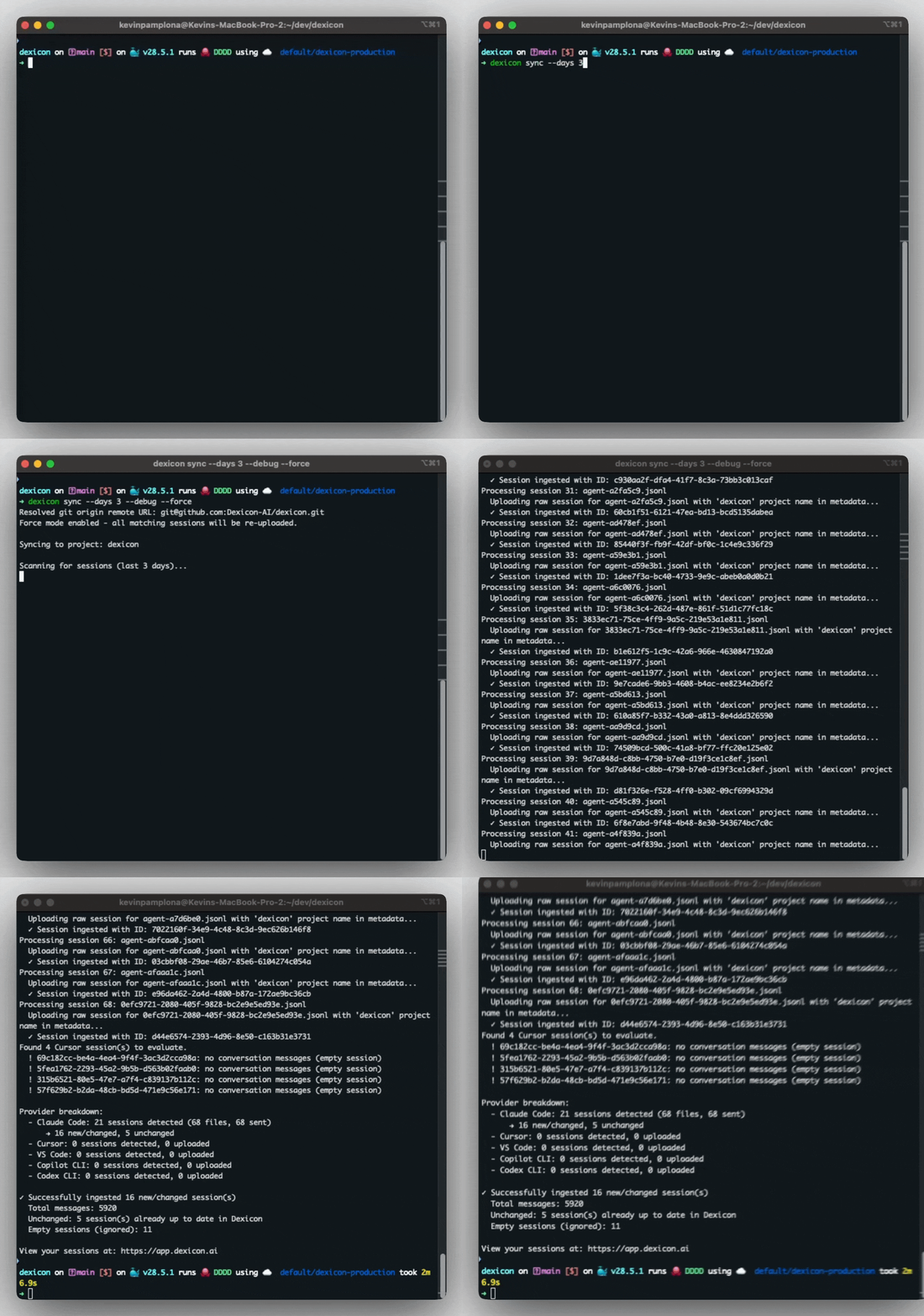
To capture AI coding sessions, install the Dexicon CLI and sync your session history.
brew install Dexicon-AI/tap/dexicon
dexicon init
dexicon login
dexicon syncRun dexicon sync from the git repository folder root. This uploads your local session history into Dexicon. We only index agent sessions, no source code is touched.
Once synced, sessions are viewable at app.dexicon.ai/sessions. Each session includes the full transcript and tool calls from your coding agent session.
Sessions also link to the knowledge items extracted from them, allowing you to trace any knowledge back to the original conversation.
For Windows installation, non-Homebrew options, and detailed setup instructions, see our quickstart guide.
Uploading Documents
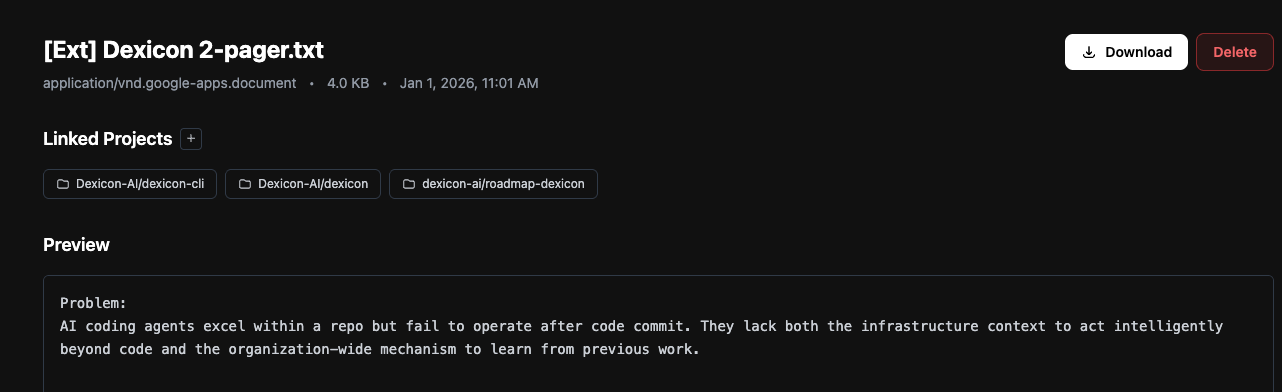
To upload documents, visit app.dexicon.ai/documents.
You can upload files directly (.txt, .md, .pdf) through our web app, or connect your Notion or Google Drive account to directly import documents.
Each document has a details page showing which knowledge items were extracted from it, so you can trace any piece of knowledge back to its source document.
Questions or Feedback? Want a demo or need help onboarding?
Reach out to us at team@dexicon.ai or on Discord.
FAQ
Is Dexicon for individuals or teams?
Both. We built Dexicon with the principle that it should be useful for an individual engineer who wants to capture their sessions, save decisions, and have that knowledge available.
But knowledge compounds. As usage scales across more team members, Dexicon extracts insights at the team level and surfaces patterns that no single engineer would see on their own.
What features require GitHub or source code access?
None. Our CLI syncs agent sessions only. Source code never touches our servers. Session content is encrypted at rest and in transit. SOC2 certification coming soon.
What coding agents do you support?
Session sync: Claude Code, Codex, GitHub Copilot CLI, Cursor, VS Code.
Coming soon: OpenCode, Windsurf, Gemini-CLI.
MCP integration works with any compatible agent, including web-based agents such as Claude.
If you need support for another coding agent, please contact us at team@dexicon.ai.
Can I self-host or use a private cloud deployment?
Please contact us for a customized deployment option at team@dexicon.ai.
Do you use my data to train AI models?
We do not sell or use your data to train any AI models.